Posts by DosDude
-
Installing Ubuntu 26.04 Server in an OpenBSD vmm(4) VM

![[image] Installing Ubuntu 26.04 Server in an OpenBSD vmm(4) VM](https://europe.pub/api/v3/image_proxy?url=https%3A%2F%2Frsadowski.de%2Fposts%2F2026%2Fvmm-ubuntu26-setup%2Ffeatured.webp) 0 comments 🔗 rsadowski.de ↗
0 comments 🔗 rsadowski.de ↗I wanted to run Ubuntu 26.04 Server inside an OpenBSD vmm(4) guest. OpenBSD’s VM console is serial only, and the Ubuntu Server ISO does not boot correctly on a serial console out of the box. This post shows how to rebuild the Ubuntu ISO with the right kernel and GRUB options so it installs cleanly through vmctl console.
-
What FreeBSD Charges at the Boundary
0 comments 🔗 vivianvoss.net ↗A system call on this machine costs fifty-two nanoseconds. The same call in a Linux guest on the very same processor costs eight hundred and sixteen. Neither number is about the kernel type, and that is the finding. The Bench Marker.
-
I knew there was a reason everyone was so nice for a change
![[image] I knew there was a reason everyone was so nice for a change](https://europe.pub/api/v3/image_proxy?url=https%3A%2F%2Flemmy.ml%2Fpictrs%2Fimage%2F1ad13c77-fdb8-42e5-9ec2-1860718507f1.jpeg) 3 comments
3 commentsI knew there was a reason everyone was so nice for a change
-
This and not returning from my lunch break
![[image] This and not returning from my lunch break](https://europe.pub/api/v3/image_proxy?url=https%3A%2F%2Flemmy.ml%2Fpictrs%2Fimage%2F70f68869-24f4-475c-9e2d-7f140ed85ed0.jpeg) 4 comments
4 commentsThis and not returning from my lunch break
-
CDs Are Booming Again With 17.5 Million Units Sold in the First Half of 2026
15 comments 🔗 hypebeast.com ↗CDs Are Booming Again With 17.5 Million Units Sold in the First Half of 2026
-
What about ThinkCentre M710q, M720q and *BSD
![[image] What about ThinkCentre M710q, M720q and *BSD](https://europe.pub/api/v3/image_proxy?url=https%3A%2F%2Fwww.tumfatig.net%2Fimages%2F2026%2Fthinkcentres.jpg) 2 comments 🔗 tumfatig.net ↗
2 comments 🔗 tumfatig.net ↗Thanks to being subscribed to self-hosting and homelab feeds, I yet again was trapped by compulsive buying and collector’s impulse while browsing the local refurb marketplaces. This may end now. Until then, here’s a quick look at ThinkCentre M710q and M720q on various BSD systems.
-
We're back, baby!
![[image] We're back, baby!](https://europe.pub/api/v3/image_proxy?url=https%3A%2F%2Fdiscuss.tchncs.de%2Fpictrs%2Fimage%2F4237e44e-8fb7-4acc-a5ff-fc177f41f41f.webp) 0 comments
0 commentsFound this post on reddit, decided to repost here since I think it's funny 😅
Link to the original post.
-
A small update on ScreenGuard, Finally reached 50+ downloads 🎉
![[image] A small update on ScreenGuard, Finally reached 50+ downloads 🎉](https://europe.pub/api/v3/image_proxy?url=https%3A%2F%2Ffiles.catbox.moe%2Ftlwynz.jpg) 0 comments
0 commentsA small update to this digital wellbeing software since my last post.
This is a prerelease version which i have tagged to be stable and slated for future release and add to main branch from the beta branch.This highlight is less about asking you guys to try out the beta release but more in the honor of over 3+ months of development.
What makes me happy the most is that the project which i started even without a repository just to monitor my own system and usage has now come this far with over 50+ downloads 🎉☺️This beta release now polishes on various little things which are actually necessary for a first time set up and proper user control as Now you can:
- carries forward the settings screen from previous beta release
- replaces notifications and sounds tab with general which now includes appearance settings
- you can now Stop , restart or RESET the Daemon and its preferences in settings
- Pomodoro settings which were half baked in the first release have now been added to settings to enable a looping focus mode for people at work with CUSTOM BREAK TIME
- Most Importantly (i feel) FIRST time setup issues have been fixed and in an attempt the first time ScreenGuard daemon setup pop up dialog (1st image) has been made
The Release v0.1.1 releases this October by second week, and I will continue testing the beta version to look for sectors that need polishing if any.
This is still limited to GNOME on wayland and x11 for other environments systems and primarily developed by me on my fedora 44 system and the project ScreenGuard still has a very Long way to go;
But working on it alone has given me much exposure to project sharing on platforms and most importantly a lot of invaluable experience and the true zeal of development instead of the boredom of being a 9 to 5 dev at a corporate who don't care for you.
Github beta release link: https://github.com/adityakrishnan005-a11y/ScreenGuard/releases/tag/v0.1.1-beta.4
The code for this is visible on the beta branch to keep the main working tree clean for new features additions.
Feedback from other desktop environments is widely appreciated, u can try the application out by switching to x11 session temporarily if you are using any DE which is not GNOME wayland or if u are on a DE which is primarily x11 based (Cinnamon, i3, etc) then u are good to go as they ARE FULLY SUPPORTED.
thank you everyone for your supports, criticisms and feedbacks ever since the project came online on github.
By Developer @Aditya_K9999@lemmy.today
-
A small update on ScreenGuard, Finally reached 50+ downloads 🎉
0 commentsA small update to this digital wellbeing software since my last post.
This is a prerelease version which i have tagged to be stable and slated for future release and add to main branch from the beta branch.This highlight is less about asking you guys to try out the beta release but more in the honor of over 3+ months of development.
What makes me happy the most is that the project which i started even without a repository just to monitor my own system and usage has now come this far with over 50+ downloads 🎉☺️This beta release now polishes on various little things which are actually necessary for a first time set up and proper user control as Now you can:
- carries forward the settings screen from previous beta release
- replaces notifications and sounds tab with general which now includes appearance settings
- you can now Stop , restart or RESET the Daemon and its preferences in settings
- Pomodoro settings which were half baked in the first release have now been added to settings to enable a looping focus mode for people at work with CUSTOM BREAK TIME
- Most Importantly (i feel) FIRST time setup issues have been fixed and in an attempt the first time ScreenGuard daemon setup pop up dialog (1st image) has been made
The Release v0.1.1 releases this October by second week, and I will continue testing the beta version to look for sectors that need polishing if any.
This is still limited to GNOME on wayland and x11 for other environments systems and primarily developed by me on my fedora 44 system and the project ScreenGuard still has a very Long way to go;
But working on it alone has given me much exposure to project sharing on platforms and most importantly a lot of invaluable experience and the true zeal of development instead of the boredom of being a 9 to 5 dev at a corporate who don't care for you.
Github beta release link: https://github.com/adityakrishnan005-a11y/ScreenGuard/releases/tag/v0.1.1-beta.4
The code for this is visible on the beta branch to keep the main working tree clean for new features additions.
Feedback from other desktop environments is widely appreciated, u can try the application out by switching to x11 session temporarily if you are using any DE which is not GNOME wayland or if u are on a DE which is primarily x11 based (Cinnamon, i3, etc) then u are good to go as they ARE FULLY SUPPORTED.
thank you everyone for your supports, criticisms and feedbacks ever since the project came online on github.
By Developer @Aditya_K9999@lemmy.today
-
Frieren: Beyond Journey's End Returns With New Look Ahead of Season 3
![[image] Frieren: Beyond Journey's End Returns With New Look Ahead of Season 3](https://comicbook.com/wp-content/uploads/sites/4/2026/09/Frieren-Beyond-Journeys-End-3rd-Anniversary-Anime.jpg?resize=2000,1125) 1 comments 🔗 comicbook.com ↗
1 comments 🔗 comicbook.com ↗Frieren: Beyond Journey's End Returns With New Look Ahead of Season 3
-
PSA: Recent Chrome/Chromium update breaks font cache, causing KDE Plasma to crash on login
13 commentsChrome version 154.0.8037.57-1 updated its statically linked libfontconfig, and now its cache is stomping on the user-level font cache.
To fix this, press
Ctrl + Alt + tto open a terminal, and runrm -rf ~/.cache/fontconfigAnd then reboot.
Note that opening Chrome (or a Chromium-based program) will break it again. I edited my
~/.local/share/applications/google-chrome-beta.desktopto do this:Exec=env XDG_CACHE_HOME=/home/user/.cache/chromecache/ /usr/bin/google-chrome-beta %UMore info:
https://issues.chromium.org/issues/565052667
https://gitlab.freedesktop.org/fontconfig/fontconfig/-/work_items/538
-
Post thumbnails on the left or on the right?
 23 comments
Currently, PieFed puts post thumbnails on the right, which is a bit unusual but looks more consistent when there is no thumbnail (which happens rarely). I've put together a visual showing how it could look with thumbnails on the left. What do you think?
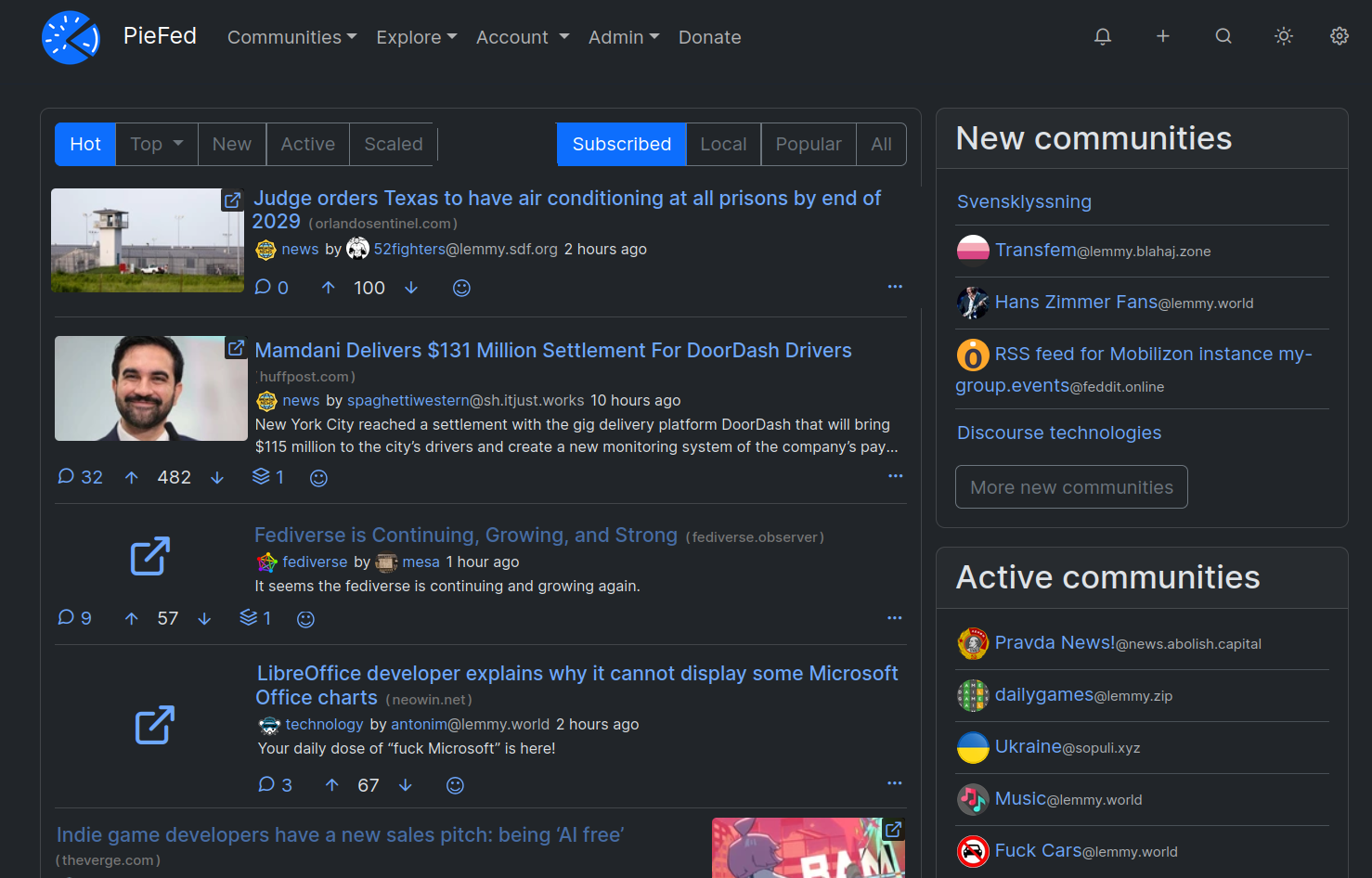
I wasn't sure whether to put the comment counts and voting buttons below the thumbnail or aligned with the text so I made examples of both. Please let me know in the comments about that.
-
[OC] A shared 256x256 canvas, and the machine that erases it every night
0 comments 🔗 ultimaluz.com ↗
This is a screenshot of a shared canvas, taken today. The drawings on it were painted by hand, one pixel at a time, by the handful of people who stopped by this week (a few of them by me). The small warm specks scattered over the grey ruins are embers the world relights on its own. Nothing in the image is AI generated art: the AI in this game only erases.
The dark areas are not empty space. They are what the adversary has already taken. The game is a 256x256 canvas anyone can paint on from a browser with no account, and an adversary called La Maquina who spends all day putting the lights out again. She runs sieges, she declares blackouts on a quadrant, and she says what she is doing in a panel while she does it.
She does not only erase. What she takes she builds with: when she knocks a storey off a tower someone raised, she raises one of her own in the dark cell next to it, always cold, never coloured. Colour is the one thing she cannot have. Reclaim that cell and her tower comes down in a single pixel.
The flame in the middle is what everyone defends. It is protected for the first days of each era, and if she ever puts it out, the era ends and the world is reborn from its ruins. What you are looking at is era 5.
Free, no account, no ads. The link opens on the yellow figure above the flame: https://ultimaluz.com/r/lemmy-pixelart?at=124%2C88
I made it. Happy to answer anything about how the canvas or the adversary work.
-
Ultimate security
![[image] Ultimate security](https://media.piefed.social/posts/z8/Yi/z8Yik8CnVtzIeTr.webp) transcript68 comments
transcript68 comments -
Dutch consumer group files lawsuit against Epic for misleading young players on Fortnite, seeking more than €100m in compensation
![[image] Dutch consumer group files lawsuit against Epic for misleading young players on Fortnite, seeking more than €100m in compensation](https://assetsio.gnwcdn.com/fortnite_qUEC8D4.webp?width=1200&height=630&fit=crop&enable=upscale&auto=webp) 0 comments 🔗 gamesindustry.biz ↗
0 comments 🔗 gamesindustry.biz ↗Dutch consumer group files lawsuit against Epic for misleading young players on Fortnite, seeking more than €100m in compensation